For custom embroidery shops

Your whole embroidery business, in one place.

Broidry is order-management software for independent embroidery shops. Orders from Facebook messages, texts, your own shop page, and Square all go in one place. Broidry shows you what to do today and collects payment before you stitch. It runs on your computer and on your iPhone. Your history from Etsy, Shopify, Squarespace, Wix and PayPal uploads in one file.

Opening a shop is free, and the Free plan stays free until your first sale. Signing up does not ask for a credit card. The Free plan covers 15 orders a month, however your customers pay.

Every order in one place

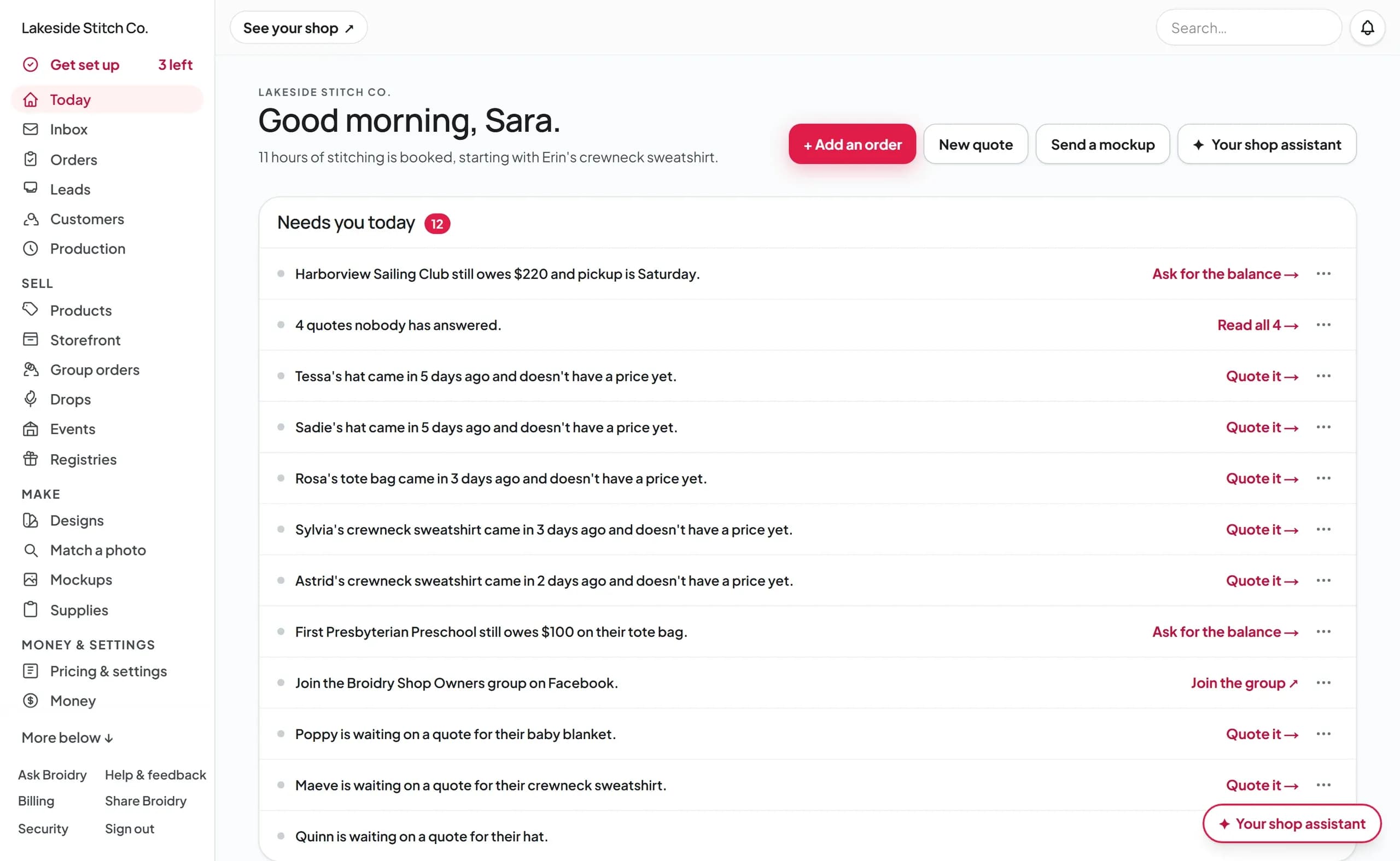
Open Broidry and see what to do today.

Your Today page shows balances still owed, quotes nobody has answered yet, and orders that came in without a price. Each line has a button for the next step.

broidry.com/dashboard
The Broidry Today page for a busy shop: a Needs you today list with a balance to collect before Saturday's pickup, quotes nobody has answered, and new orders waiting for a price, each with a button for the next step

Orders from anywhere.

Paste a Facebook or Instagram conversation, or drop in a screenshot of a text. Broidry fills in the order and lists anything the customer left out.

Your shop page and Square, too.

Orders from your own shop page come in with every detail filled in. Connect Square once and your Square sales come in on their own.

One board for every order.

The board has a column for each step: New, Quoted, Paid, Making, and Done. To move several orders or message all their customers at once, check the box next to each order in the list view.

A list of what to stitch next.

The production list sorts every open order by ship date. It also adds up what's on your table, like 22 hats and 12 tote bags.

Open your shopThe Free plan costs nothing until your first sale. You don't need a credit card to sign up.

Texting

Text your customers from your shop's own number.

On the Shop plan ($39 a month), your shop gets its own phone number. Customers never see your cell number. A customer checks “Text me updates about this order” when they order. From then on, Broidry texts them whenever there's news about their order.

  • The updates go out on their own. Broidry texts them when their quote is ready, their mockup is ready to approve, a balance is due, their payment goes through, and their order is ready for pickup or on its way. Each text links to their order page.
  • You can write to them, too. Write a message on the order. If the customer said yes to texts, your message goes to their phone. When they text back, the reply shows up on the order.
  • Email still goes out. Every update also goes out by email. Customers who don't sign up for texts still hear from you.

The Shop plan ($39 a month) includes 200 texts a month. The Atelier plan includes 1,000. There is never a charge for going over. Updates go by email until the month starts over.

Read: How texting works, start to finish →

Lakeside Stitch Co.

(920) 555-0148

Tuesday 9:12 AM

Lakeside Stitch Co.: Your quote is ready. See it and pay here: broidry.com/quote/k7Qm2
Reply STOP to stop texts.
Just paid! Thank you!!
Lakeside Stitch Co.: Your $54 payment went through. Thank you! Your order page: broidry.com/track/k7Qm2

Friday 2:40 PM

Lakeside Stitch Co.: Your order is ready for pickup! See your order and message us here: broidry.com/track/k7Qm2

The texts your customer gets from your shop's own number.

Messages

All your customer messages in one inbox.

Questions from your shop page and messages on orders show up in one list. Each one is labeled, so you can see right away who has paid and who hasn't yet. When Broidry emails you a customer's message, you can click Reply in your own email app. Your answer goes to the customer and shows up with their messages in Broidry.

  • Every conversation is labeled. Each one says Potential customer or Paying customer. To open the order, click the button on the conversation.
  • A Spam folder for junk. Sales pitches and messages full of links go into a Spam folder. Each one says why it was moved there. If a real customer ends up there, one click moves them back to your inbox.
Read: Your Inbox, start to finish →

Inbox

Inbox · 2Spam · 1
  • M

    Maria G.

    2m
    Potential customer

    Do you monogram waffle robes? I'd need six by…

  • D

    Dana W.

    1h
    Paying customer

    You: All paid! Your bucket hats go on the machine…

  • S

    SEO Growth Pros

    3d
    Held as spam — 3 links

    Rank #1 on Google! Limited offer for embroidery…

The Broidry app for iPhone

Run your shop from your phone.

Get the Broidry app free from the App Store. Sign in with the email and passphrase you use for Broidry now.

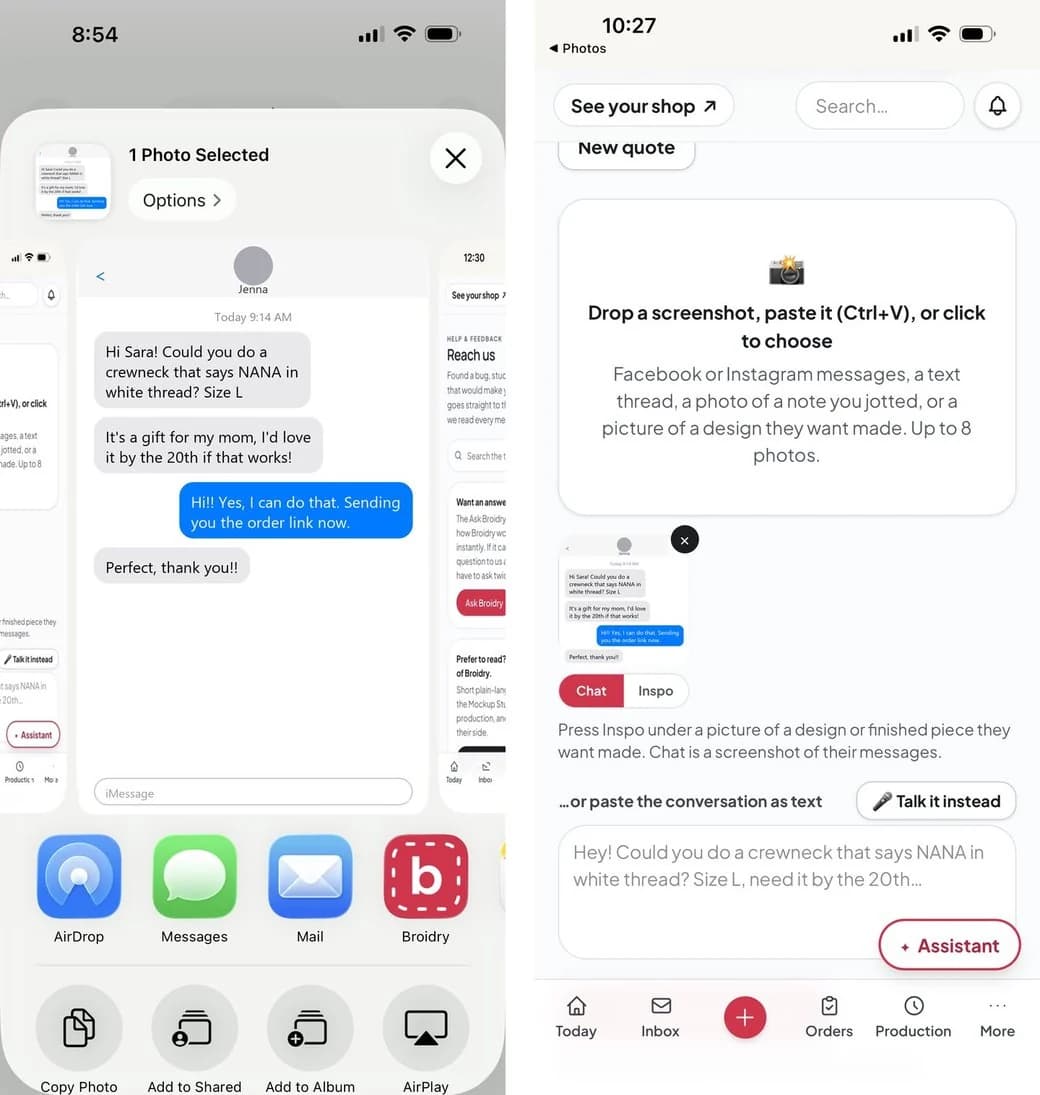
  • Start an order from a picture. When a customer sends a photo, or you screenshot their message, share it to Broidry. A new order opens with the picture already in it.
  • Alerts on your phone. Your phone shows an alert when a new order comes in, a customer sends a message, or a payment arrives.
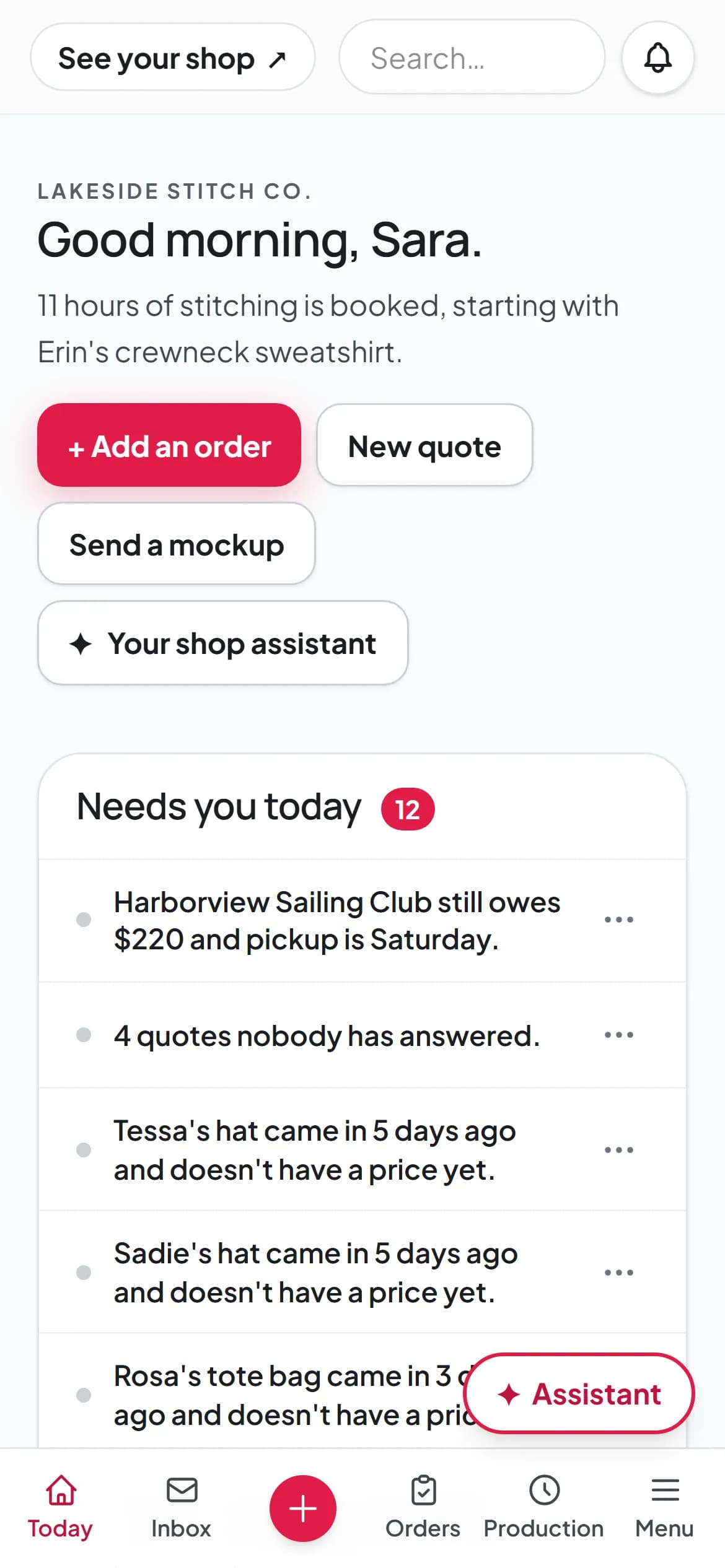
  • Your whole dashboard. You can open Today, Inbox, Orders and Production from any screen. Press + to start a new order.
Get the iPhone appOn an Android phone, open broidry.com in Chrome and add it to your home screen.
The iPhone Share sheet with Broidry in the row of apps, next to a new Broidry order with the customer's screenshot already in it
Share a customer's screenshot to Broidry.
Broidry's Today page on a phone: Needs you today, with Today, Inbox, a + button, Orders, Production and Menu along the bottom
Your Today page in your pocket.

What Broidry does for your shop

Six jobs you stop doing by hand.

01

Turn a Facebook message into a real order

When someone messages you on Facebook or Instagram to order something, copy the conversation or take a screenshot and put it into Broidry. Broidry fills in the order with what they want, the name, and the colors, and lists any detail the customer forgot to mention. You can ask for everything at once instead of going back and forth.

See how it works →
02

Get paid before you stitch

Customers pay by card when they order. Broidry keeps track of what's been paid, what's still owed, and what each job actually earned you after materials.

See how it works →
03

Know if you can really hit a deadline

Tell Broidry how fast your machine runs and how long a hooping takes you. Broidry uses those numbers and each design's stitch count to line up your orders on a schedule. When a customer asks “can you have it done by Friday?”, you can look at the schedule and give an honest answer.

See how it works →
04

Ask your Shop Assistant

On every plan, your Shop Assistant answers your how-to questions. It also knows your orders. Ask what's due this week or who still owes you. Or type “Erin paid $40 cash” and it records the payment. (Maker plan, $19 a month)

See how it works →
05

Show customers their piece before you stitch it

Broidry makes a picture of the finished piece, with their name in the font and thread colors they chose, on the actual product, and sends it to your customer to approve. If the name is spelled wrong, they catch it on their phone before you ever stitch it.

See how it works →
06

Bring past customers back

Broidry keeps a list of everyone who has ever ordered from you. When someone hasn't ordered in a while, Broidry drafts a friendly follow-up message based on what they bought last time. You read the message, change anything you want, and send it. (Shop plan, $39 a month)

See how it works →

Mockups

Your customer approves the mockup before you stitch.

Send a mockup and your customer gets a link to a page like this one. They don't need to log in or make an account. They see the piece at its real stitched size. They approve it or tell you what to change. Their approval is saved on the order.

The lettering comes from the same stitch files your machine uses. It's shown on a photo of your actual blank.

Try the Mockup Studio yourself →

Live embroidery events

For when you're hired to stitch on the spot.

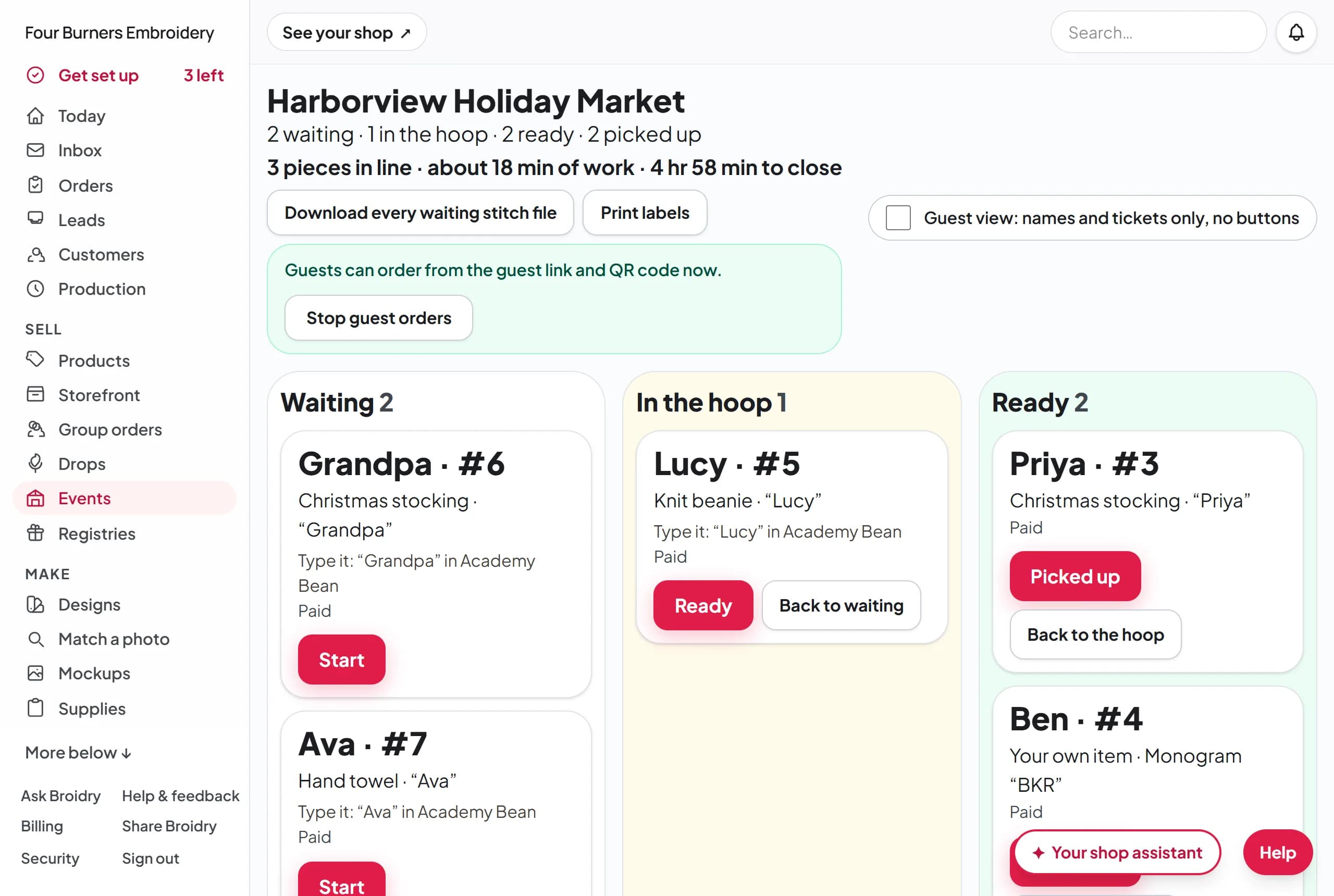
On the Shop plan ($39 a month), with planning on the Maker plan ($19 a month). When you're hired to stitch on the spot at a store's customer night, a gym, a wedding, or a baby shower, Broidry makes the QR code sign for your table. Guests order on their own phone. Every piece gets a ticket number. The board shows what is in the hoop, what is ready, and how much work is left before you close.

broidry.com/dashboard/events
The ticket board at an event: tickets waiting, one in the hoop, two ready to pick up, and the work left before close
A guest's phone at the event: the order form from the QR card, with the menu, a name to stitch, and a thread color
What a guest sees after scanning your QR code sign.

Guests order on their phone.

Broidry makes the QR code sign for your table. A guest scans it, picks from your menu, and types the name. Sometimes the host pays for every piece. If not, guests pay by card on their phone or at your table.

A ticket number for every piece.

The board shows every ticket by first name: waiting, in the hoop, ready. One click texts or emails the guest to tell them their piece is ready.

Every ticket says what to stitch.

Each ticket on the board shows the words, the font and the thread color. Press one button to download every waiting machine file.

Quote the host and close out the day.

Your hourly rate, setup, travel, and deposit go out as a real quote. After the event, the close-out shows every piece, what was paid, and what is still owed.

Planning an event, the host quote, and the printables are on the Maker plan ($19 a month). The live day, with the guest link, the queue board, and the ready text, is on the Shop plan ($39 a month). See how a live event runs, start to finish →

Real shops, real dates

How long until you're actually paid?

60 shops on Broidry have collected their first payment. Here are the four fastest.

  1. One shop's first week

    Opened their shop
    Sep 24
    First listing up
    Sep 24
    First order in
    Sep 24
    First payment
    Sep 24

    Signup to paid

    same day

  2. One shop's first week

    Opened their shop
    Sep 30
    First listing up
    Sep 30
    First order in
    Sep 30
    First payment
    Sep 30

    Signup to paid

    same day

  3. One shop's first week

    Opened their shop
    Nov 4
    First listing up
    Nov 4
    First order in
    Nov 4
    First payment
    Nov 4

    Signup to paid

    same day

  4. One shop's first week

    Opened their shop
    Sep 2
    First listing up
    Sep 2
    First order in
    Sep 3
    First payment
    Sep 3

    Signup to paid

    1 day

The dates come from each shop's own order records. Every kind of payment counts: card, Venmo, or cash in person.

Never sold before?

You can open your shop before you make your first sale.

You don't need a website, a payment system, or a single customer to start. The day you sign up, Broidry gives you a shop page with your products on it, prices built from your real costs, and a way to take card payments. When the first person asks “could you make me one?”, you already have a link to send them.

  • A shop page on day one. Your products, photos, and prices live on a link you can share anywhere.
  • Prices that protect you. Every price is built from your materials and stitch count, so you never undercharge by accident.
  • Card payments from the first order. Customers pay when they order, so you're paid before you stitch.

The Free plan costs nothing until your first sale. You don't need a credit card to sign up.

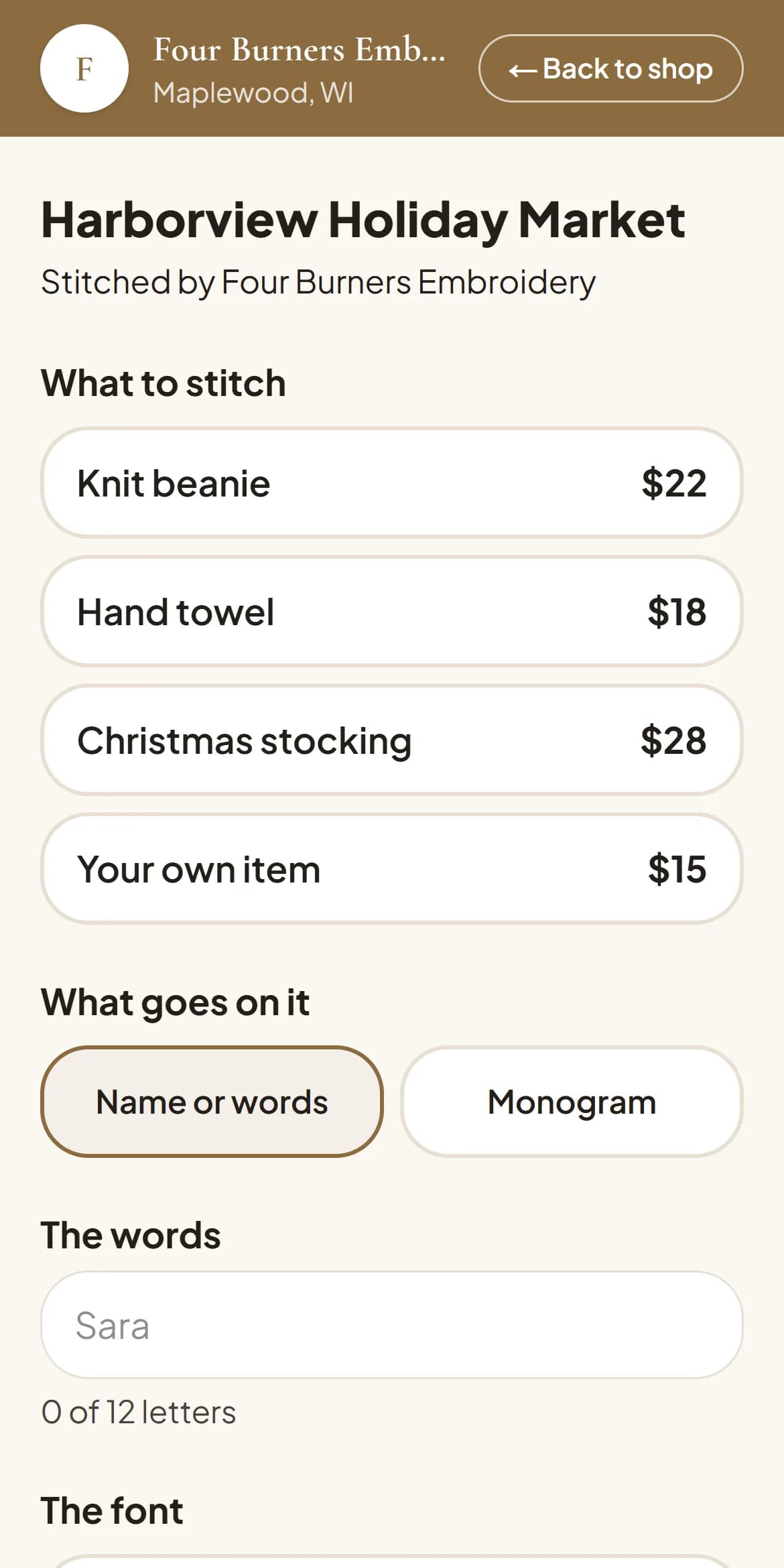
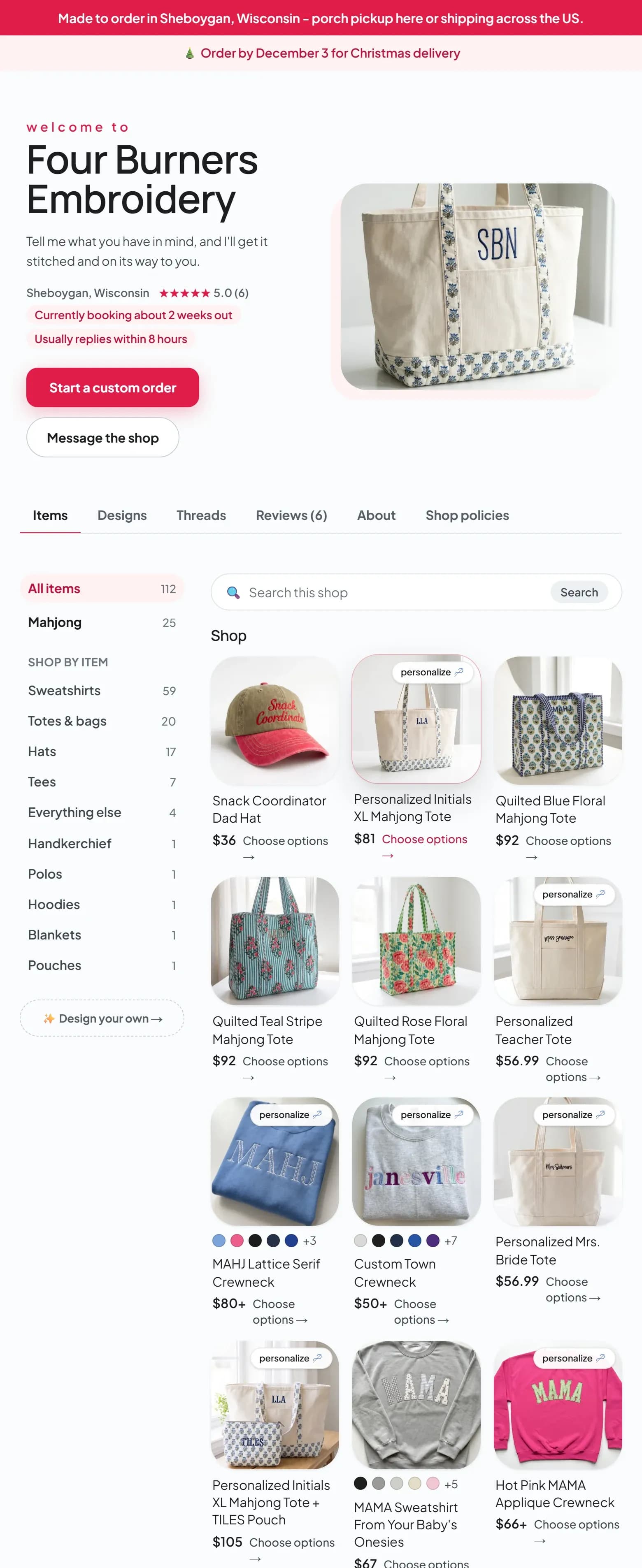
The Four Burners Embroidery shop page on Broidry, scrolling through the live product grid: photos, prices, and personalize buttons

The full tour

See the whole platform.

These are screenshots of a busy shop inside Broidry. Click through the pages you would use every day.

Would you rather watch a video first? Watch Broidry in three minutes →

Click a page to see it

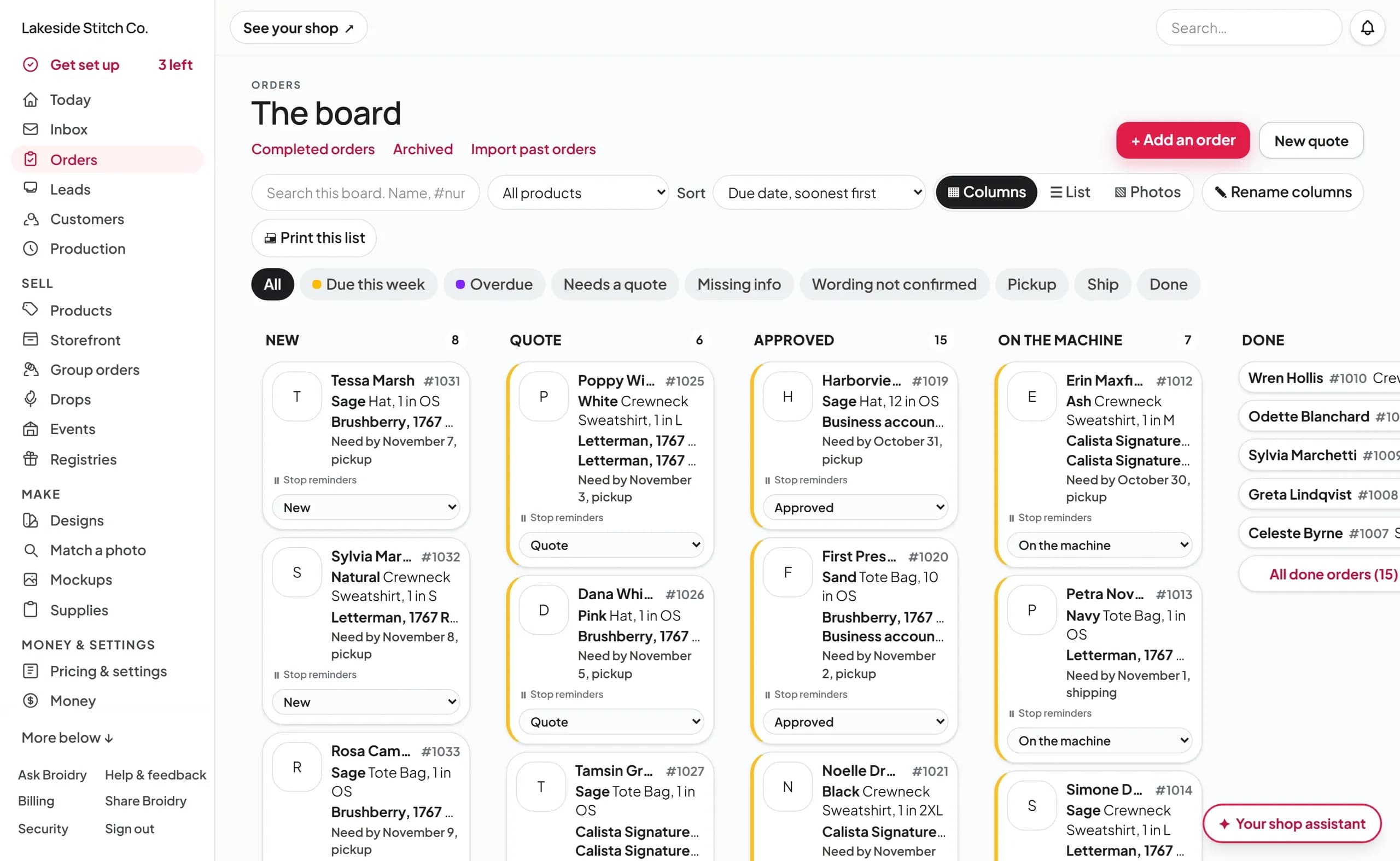
Every order sits on one board: New, Quote, Approved, On the machine, and Done.

See orders & quotes →
The Broidry orders board: columns for New, Quote, Approved, On the machine, and Done, filled with order cards
  • Paste a Facebook or Instagram message and Broidry builds the order, flagging anything the customer left out.
  • Filter to what matters: due this week, overdue, needs a quote, or missing information.
  • To move several orders or message all their customers at once, check the box next to each order in the list view.
  • Quotes come from your rate card, so every price is consistent.

And there's more

Everything else that comes with your shop.

All of this comes with your shop. There are no separate add-ons to buy.

Group orders

One link collects a whole team, club, or school order. Every member picks their size and pays their own share, and it comes back to you as one batched order.

Ask your Shop Assistant

Ask how anything in Broidry works, free on every plan. On the Maker plan, type “what font did I use on Sara's tote?” and get the answer from your own order history.

The machine file library

Drop in a design ZIP exactly as you downloaded it. Broidry reads the stitch files, groups every format under one design, and makes it all searchable.

Run sheet & shopping list

One printable page lists everything to stitch this session: the names, the fonts, and the thread numbers, plus the blanks to buy.

Selling

  • A limited-time release of a design with a close date. Buyers order before it closes, and you stitch the whole run at once.

  • “Order by December 13 for Christmas.” You pick your last order day and it shows on your shop page and every listing. (The countdown email to your list is on the Shop plan.)

  • A place to keep the “my sister might want hats” messages before they become real orders. Email the person right from the lead's card. Their replies show up in your Inbox.

  • Printable QR cards for your booth and your packages. Customers scan the card to reorder or leave a review.

  • A QR card for the table, a queue board, a ticket number and a label for every piece, and a text when it's ready. (Shop plan)

  • Paste a list of names and sizes from a post's comments, a message, or a spreadsheet, and every line becomes its own order on the board.

  • Buyers can press Send a gift hint on anything they can order today. They get a message with the item, your shop name, and a link. They can text or email it to whoever buys their gifts.

  • Add a picture to any answer on a product's choice list. The buyer picks the crest or the fabric by pressing its picture.

  • Every US shop with an item for sale gets a picture with its name and address for its shop page and its social accounts, plus captions for the week.

  • Bring your existing Etsy listings and reviews over in minutes.

  • Connect your Shopify store once, and its paid orders show up on your board on their own.

  • One search box finds any order, customer, product, or design in your whole shop.

Money

  • Take a deposit up front and Broidry tracks the balance. One click sends the customer a reminder and collects the rest before pickup.

  • Broidry writes the reminder for a balance, a quote, or a mockup that is waiting on the customer. You press Send. Broidry sends nothing to a customer who has already paid, answered, or approved.

  • You enter your garment, stitch, and hooping rates one time, and every quote is priced from them.

  • Run a sale or hand out codes, with sale prices shown on your shop page. (Shop plan)

  • Printable invoices and itemized quotes are built from the order, so nothing is typed twice.

  • If you ruin a blank on an order, log what happened and what it cost, and your profit numbers stay honest.

Your customers

  • Every customer's record is built automatically from their orders, with tags, notes, and one-click reorder of exactly what they got last time.

  • Verified reviews from real completed orders appear on your shop page, and you can import your existing Etsy reviews.

  • After you answer at least 5 customer messages in 30 days, your shop page shows how fast you usually reply, like “Usually replies within an hour.”

  • See how many people looked at your shop, where they came from, what they looked at, and how many of them ordered. (Maker plan)

  • Buyers can find your shop by town at broidry.com/local. Your shop shows up there once you have a product for sale, a way to get paid, and your state filled in on your shop page.

  • Every shipped order creates a tracking page for your customer automatically, so they can see whether it shipped without asking you.

  • A buyer who checks the box on your order form gets a text from your shop's own phone number when a quote, a mockup, a balance, or a finished order needs them. (Shop plan)

  • Send an update to customers who opted in. Unsubscribe links are included automatically. (Shop plan)

  • Pretty printable inserts for every order, filled in from the order's own details.

Your studio

  • Mark a product as appliqué only, and no buyer is ever offered plain stitching on it.

  • Upload the embroidery fonts you already own as .PES files and use them in mockups, orders, and on your shop page.

  • Pick any Google font or upload your own font file for your shop page's headings and text. You set every color on the page too. (Maker plan)

  • Add more to your shop page: a photo with words on it, text beside a photo, questions and answers, a video, a size chart, or a how-to-order section. (Shop plan)

  • Your Google, Apple, or Outlook calendar follows one link with every due date, stitch day, and live event. (Maker plan)

  • Add a second person to your shop with their own login, so help at busy season doesn't mean sharing your password. (Shop plan)

  • Point your own web address at your Broidry shop page. (Shop plan)

  • Export everything, including orders, customers, and files, at any time in one download.

A real Broidry shop

A shop page you can share anywhere.

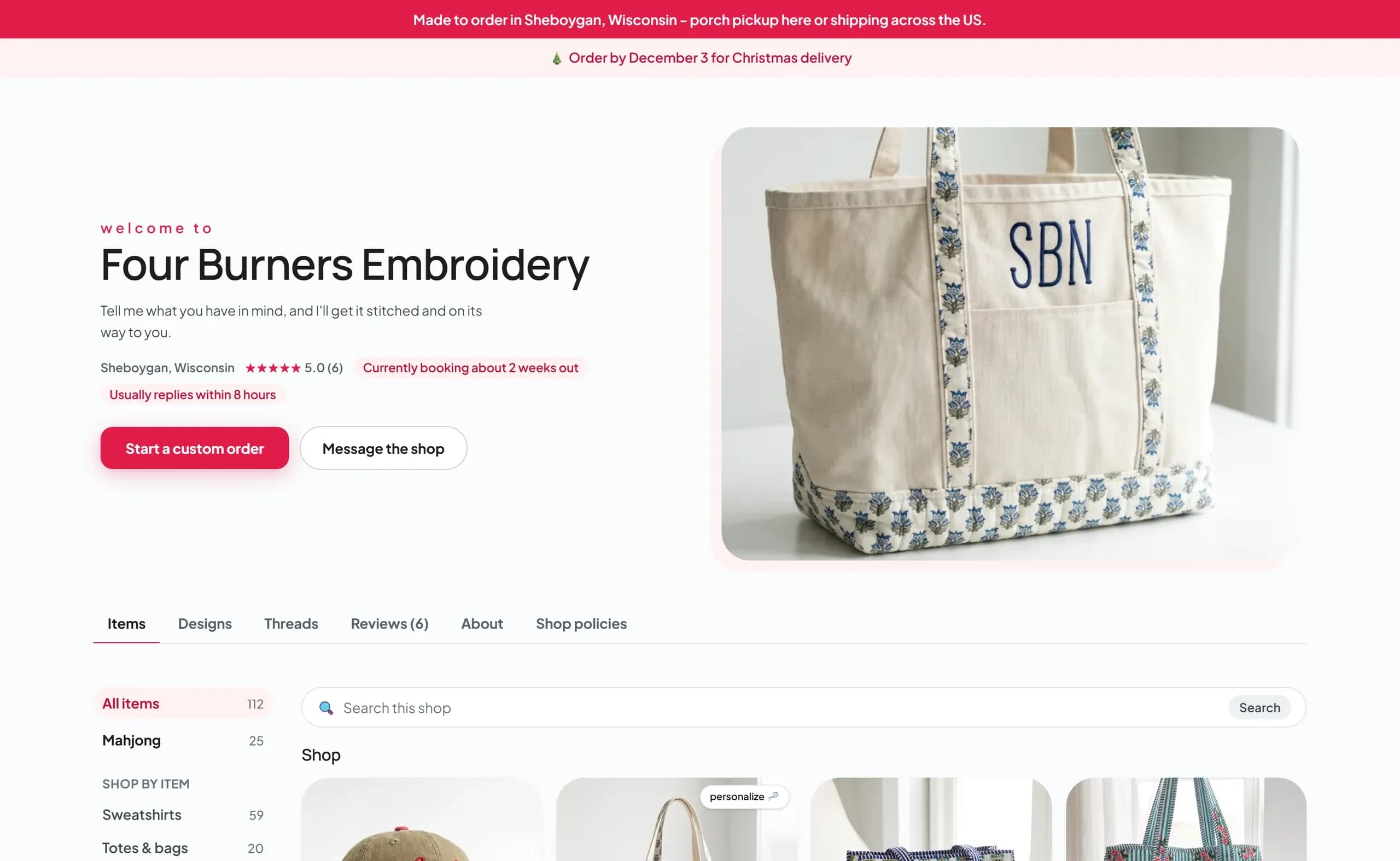
This is Four Burners Embroidery's live shop in Sheboygan, Wisconsin. Customers pick the product, type the name, and place the order. You get every detail you need.

broidry.com/s/four-burners
The Four Burners Embroidery shop page on Broidry, as a customer sees it: shop name, photos, prices, and order buttons
The Four Burners Embroidery logo
Four Burners Embroidery
Sheboygan, Wisconsin
Visit the shop →
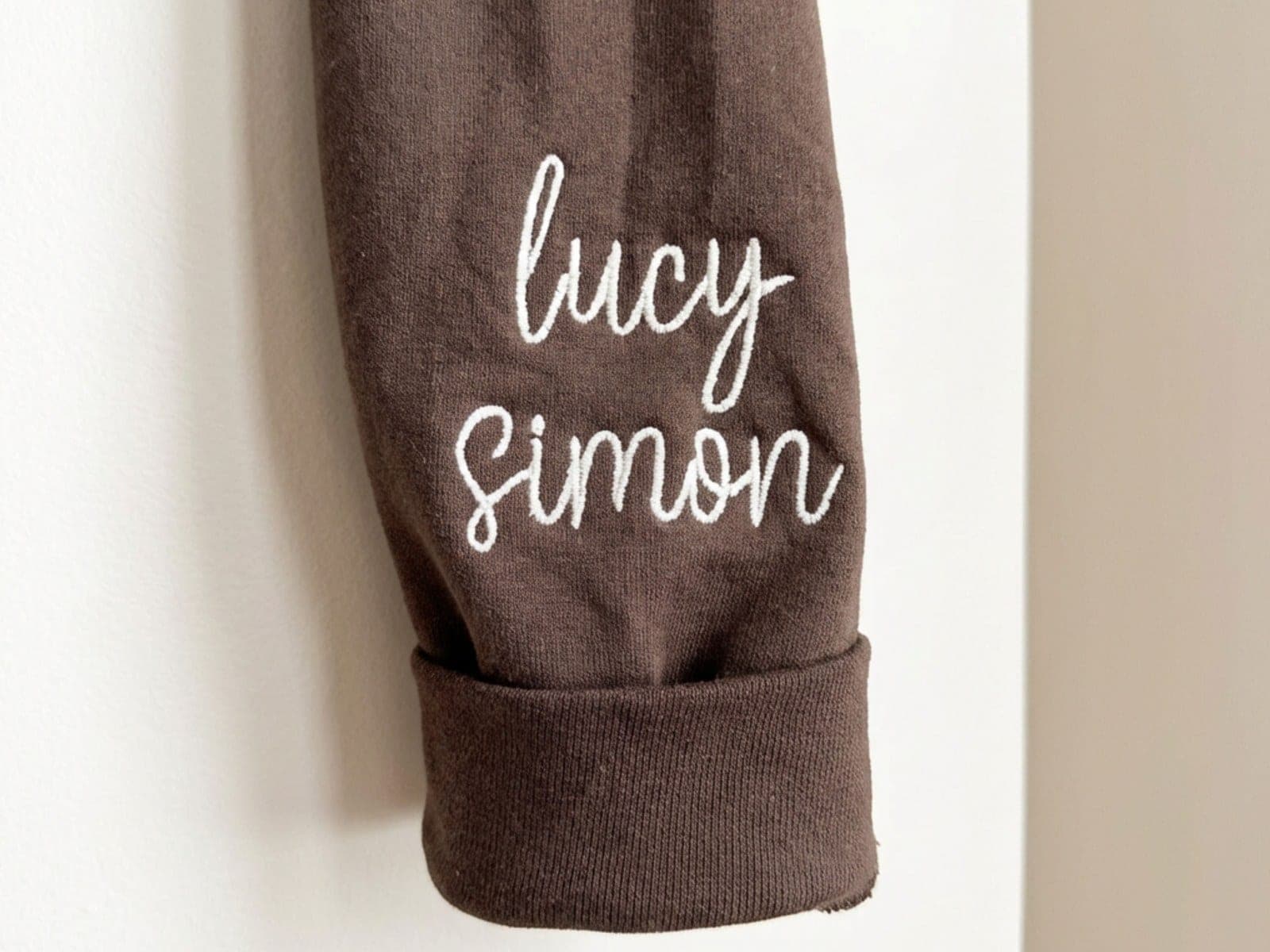
A brown crewneck sleeve with a folded cuff, embroidered with the names lucy and simon in white script

Sara's own crewneck, with her kids' names stitched on the sleeve.

Who built this

Broidry is built by an embroiderer.

Broidry is built by Sara Nelson, who owns and runs Four Burners Embroidery in Sheboygan, Wisconsin. Her orders came in through Facebook, texts, and Etsy with no single place to track them. She had folders full of downloaded embroidery designs and could never find the one she needed. So she built Broidry to run her own shop.

Free tools

Free tools for embroiderers, with no signup.

Broidry publishes free tools any embroidery shop can use, whether or not it runs on Broidry: an embroidery pricing calculator, a hoop size chart, a Madeira to Isacord thread color converter, and a digitizing fee calculator. They run in your browser and nothing you type leaves it.

All free tools →

Spend your time stitching, not chasing order details.

Broidry keeps track of the messages, the missing sizes, who has paid, and what to stitch today, so more of your day goes to stitching.

The Free plan costs nothing until your first sale. You don't need a credit card to sign up.